
Manage User Roles and Permissions
Assign roles to your team members that define what they can accomplish within MineOS.
1. Assigning Roles and Permissions
There are six roles one can have in MineOS, most of which are assigned when inviting a new user to the account through the invite a teammate flow:
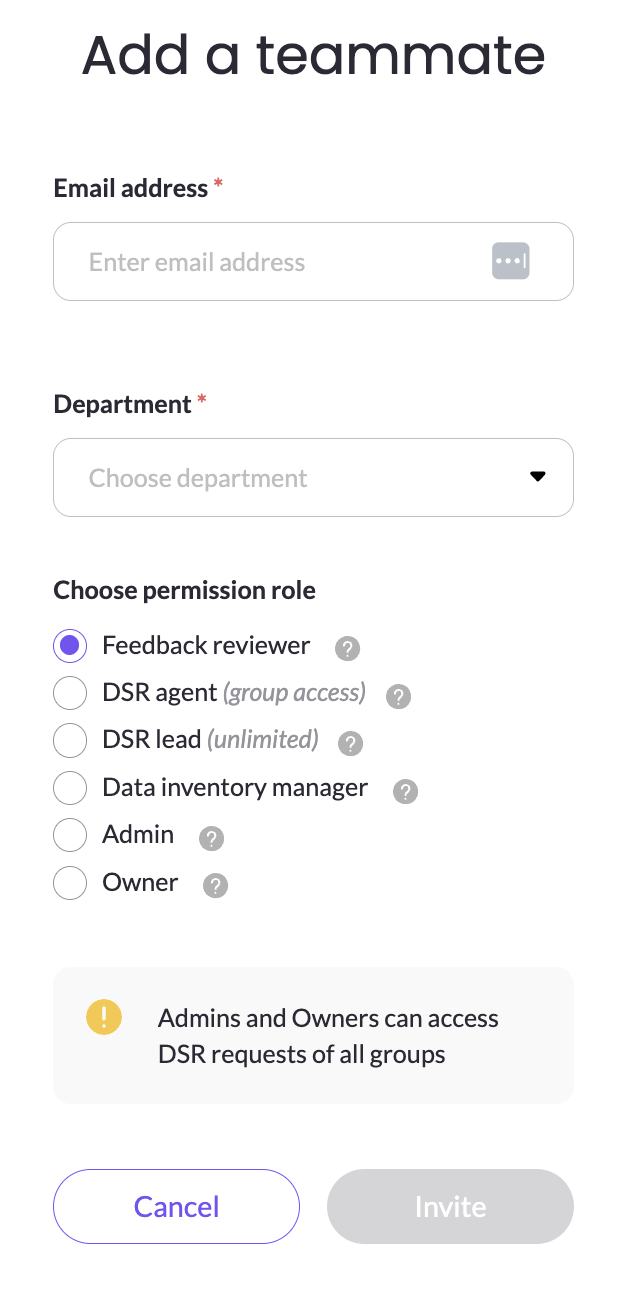
- Owner: Can perform all operations in the platform and manage other roles.
- Admin: A user with full access, but cannot manage roles except for adding Reviewers.
- Data Inventory Manager: A user with administrative oversight of data and data asset inventory specifics.
- DSR Lead: A user primarily restricted to features relevant for DSR handling of tickets assigned to his group.
- DSR Agent: A user restricted to features relevant for DSR handling of any ticket, and manage assignments.
- Feedback Reviewer: A user with the right to view some parts of the account and leave feedback.
Assigning Roles for New Users
The Owner is the first teammate that signed up for MineOS. In other words, the person creating the MineOS account will automatically be assigned as an Admin.
When additional teammates are invited, the Owner will choose which roles they're assigned. Admins are able to invite users but users invited by an Admin can only be assigned the Reviewer role.
Assigning Roles for Existing Users
Roles can be changed from the initially-assigned role for existing users, though only an Owner has this ability. There can be multiple Owner.
There must always be at least one Owner. Unless you have that role we will not allow you to remove it and change which teammate is Admin.
2. Role Definitions
Find a more detailed breakdown of feature access by role below:
| Module | Page | Owner | Admin | DSR Lead | DSR Agent | Data Inventory Manager | Feedback Reviewer |
|---|---|---|---|---|---|---|---|
| - | Home | V | V | V | V | V | - |
| - | Tasks | V | V | V | V | V | V |
| Inventory | Data Sources | V | V | - | - | V | - |
| Inventory | Radar | V | V | - | - | V | - |
| Inventory | Radar Setup | V | V | - | - | - | |
| Inventory | Employees | V | V | - | - | V | - |
| Inventory | Data Classifier | V | V | - | - | V | - |
| Compliance | Processing Activities | V | V | - | - | V | - |
| Compliance | Risk Management | V | V | - | - | V | - |
| Compliance | Business Impact Assessments | V | V | - | - | V | - |
| Compliance | DPO Advisor | V | V | V | - | V | - |
| Compliance | Policies | V | V | - | - | - | - |
| Compliance | Unused Assets | V | V | - | - | V | - |
| DSR | Overview | V | V | V | V | - | - |
| DSR | Audit log | V | V | V | V | - | - |
| DSR | Requests | V | V | V | V | - | - |
| DSR | User Search | V | V | V | V | - | - |
| DSR | Privacy Center | V | V | V | - | - | - |
| DSR | DSR setup | V | V | V | - | ||
| Consent Mgmt. | Consent Mgmt. | V | V | - | - | - | - |
| Account | Settings menu item | V | V | V | - | V | V |
| Account | Pricing menu item | V | V | - | - | - | - |
| Settings | General/ My Profile | V | V | V | V | V | V |
| Settings | General/ Account | V | V | - | - | - | - |
| Settings | Data Inventory: Properties | V | V | - | - | - | - |
| Settings | Data Inventory: Classifications | V | V | - | - | - | - |
| Settings | Data Inventory: Activities | V | V | - | - | - | - |
| Settings | Developers | V | V | - | - | - | - |
| Chat with us | V | V | - | - | - | - | |
| - | What's New | V | V | V | V | V | V |
| - | Help Center | V | V | V | V | V | V |
Next steps...
Ready to set up SSO access for the teammates you've invited to your MineOS account? Now let's set up SSO logins to MineOS.
Updated about 1 hour ago