
Privacy Center
How the Privacy Center works as your primary DSR intake channel, and where to set it up.
The Privacy Center is your public-facing intake form and the primary way data subjects submit privacy requests to your organization. When someone completes it, MineOS creates a DSR and adds it to your Requests queue, ready to process.
What the Privacy Center collects
The Privacy Center presents a short intake form where the data subject chooses the privacy right they want to exercise and provides the details you need to verify and handle their request — such as their name, email, country, address, phone number, what is their relationship with the company, and any custom questions you add.
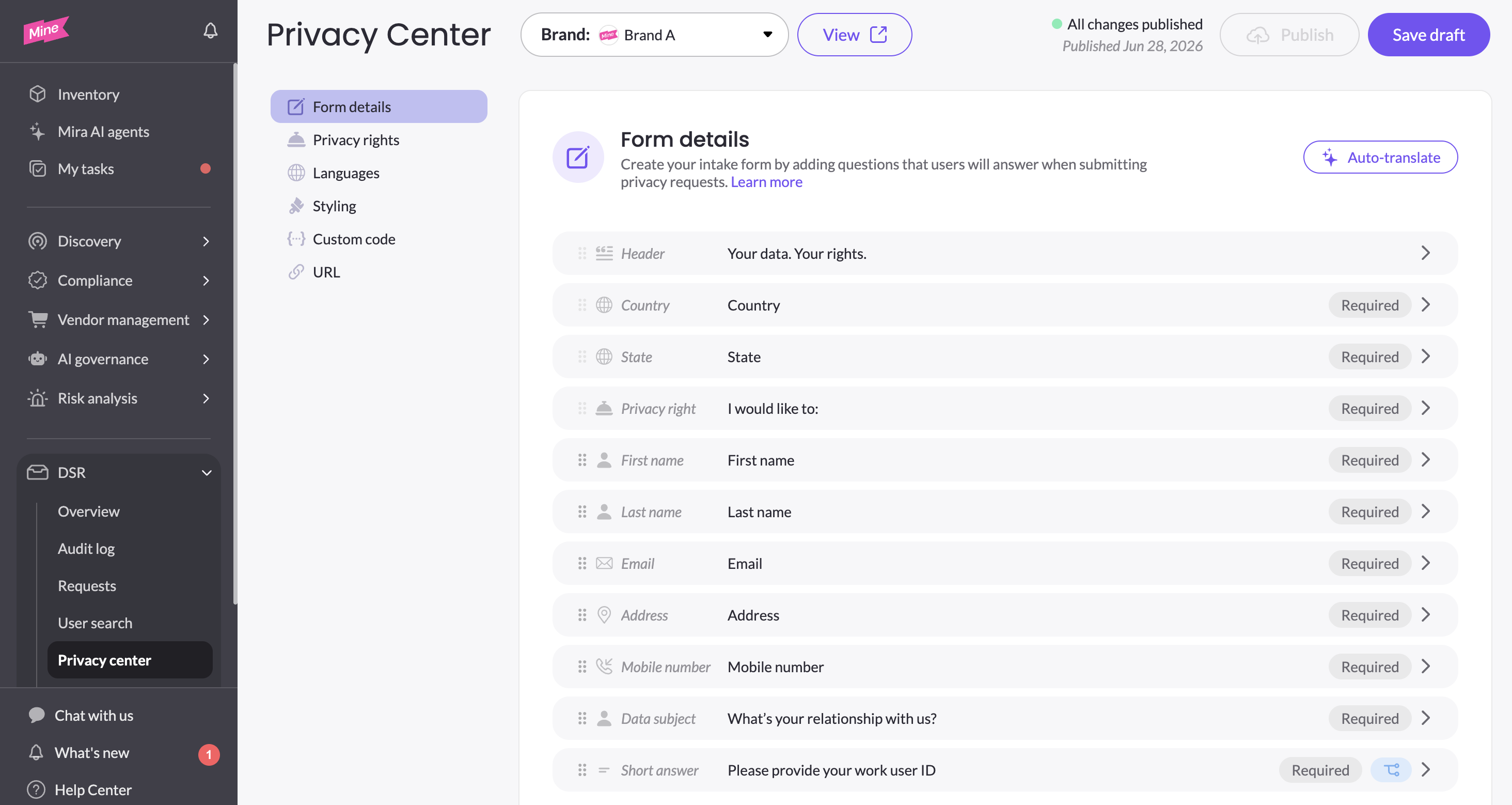
Setting up your Privacy Center
The Privacy Center is fully customizable — its form fields, rights, languages, branding, and URL are all configured in the dedicated Privacy Center section. You can define which privacy rights to present , smart conditional questions, wether a question is mandatory and manage translations efficiently in a click of a button. If you run multiple brands, each brand has its own Privacy Center. See Privacy Center for complete setup instructions.
How requests arrive
Every submission becomes a DSR associated with the brand whose Privacy Center it came through, and appears in your Requests page alongside requests from every other channel — so your team works from one place regardless of how a request was submitted.
Updated 3 months ago