
Importing Data Subject Requests
Bulk-import existing privacy requests into MineOS from a CSV file.
If you're moving to MineOS from another tool, or you've collected requests in a spreadsheet, you can bring them in all at once by importing a CSV file rather than adding each request by hand.
Import a CSV of requests
-
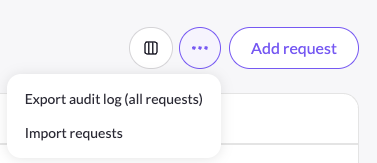
On The Requests Page, open the ⋯ (more) menu on the upper-right side of the screen and choose Import requests.
-
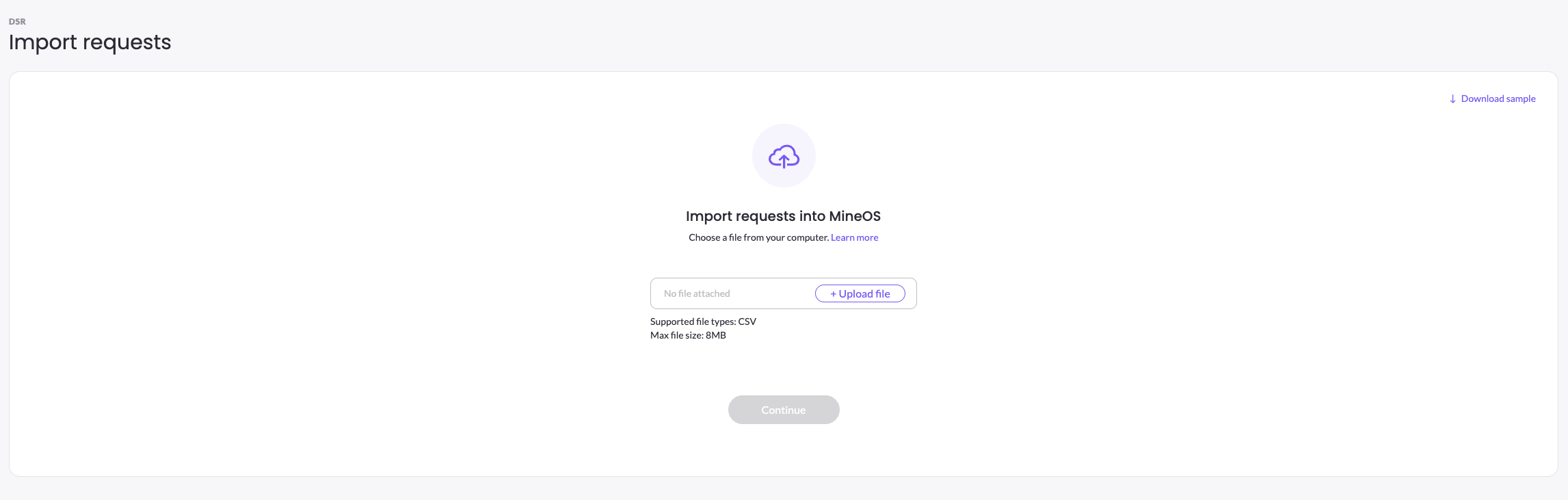
On the Import requests into MineOS screen, click Download sample to get a correctly formatted template.
-
Fill the template with your requests, then click + Upload file and select it.
-
Click Continue to import.
File requirements: CSV format, up to 8 MB.
Starting from the sample template keeps your columns aligned to the fields MineOS expects, which is the easiest way to avoid import errors.
After importing
Imported requests appear in your Requests page queue as verified requests and are processed like any other DSR.
Updated 3 months ago
Did this page help you?