
Reopening a Closed Request
Reopen a closed request to take further action — and the other actions available once a request is closed
Closing a request isn't always the end. If new information arrives or further action is needed, you can reopen a closed request and pick up where you left off — as long as it hasn't been fully redacted.
Reopen a request
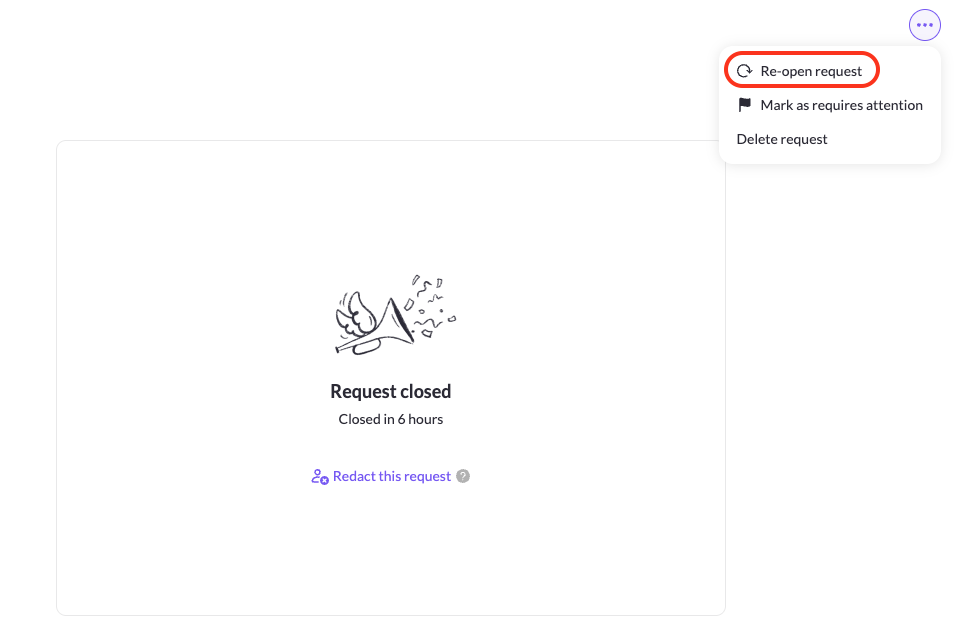
Open the closed request and, from the ⋯ menu, choose Re-open request, then confirm in the dialog. The request returns to an active state so you can process it further, message the data subject, or complete additional tasks. An audit log entry ("Reopened") is created, and the data subject isn't notified about the reopening — when you close the request again, you can choose whether to notify them at that point.
What state a reopened request returns to
A reopened request goes back to the last active state it was in before closing — for example, Edit (if it came in through email forwarding and needs verification), Unverified, or Processing — with its tasks left as they were: still-running tasks stay in progress, completed tasks stay completed, and tasks that hit an error move to Needs Action.
Reopening and Autopilot
Reopening a request does not resume Autopilot automatically. If integrations were still running when the request closed, you'll see "Autopilot is handling this request" until they finish, at which point Autopilot resets and shows "Put on Autopilot" again — it won't trigger any further steps on its own. If you want Autopilot to keep going, you'll need to reassign it manually.
Reopening a request in the redaction queue
You can reopen a request that's already in Redacting status — doing so cancels the pending redaction. If you close the request again, it re-enters the redaction queue and the countdown to redaction starts over from the beginning. Once a request reaches Redacted, it can no longer be reopened — the option is disabled.
Other actions on a closed request
From the same menu you can also Mark as requires attention to flag the request in your queue, or Delete request to permanently remove it (not recommended). You can also Redact this request to remove its personal data — see Redacting Closed Requests Automatically for doing this automatically.
Updated 3 months ago