
Eligibility & workflows
Set which regions can submit a right and define the workflow, completion reply, and deadline for fulfilling it.
Every privacy right has its own eligibility and workflow settings that control who can submit it and what happens when they do. You configure these per right, from the right's Eligibility & workflows tab.
Eligible regions
Define which regions can submit this right's requests. By default a right is available Worldwide (all countries); click + Add to restrict it to specific regions instead. Only data subjects in an eligible region will see and be able to submit the right. There should be at lease a single eligibility configured.
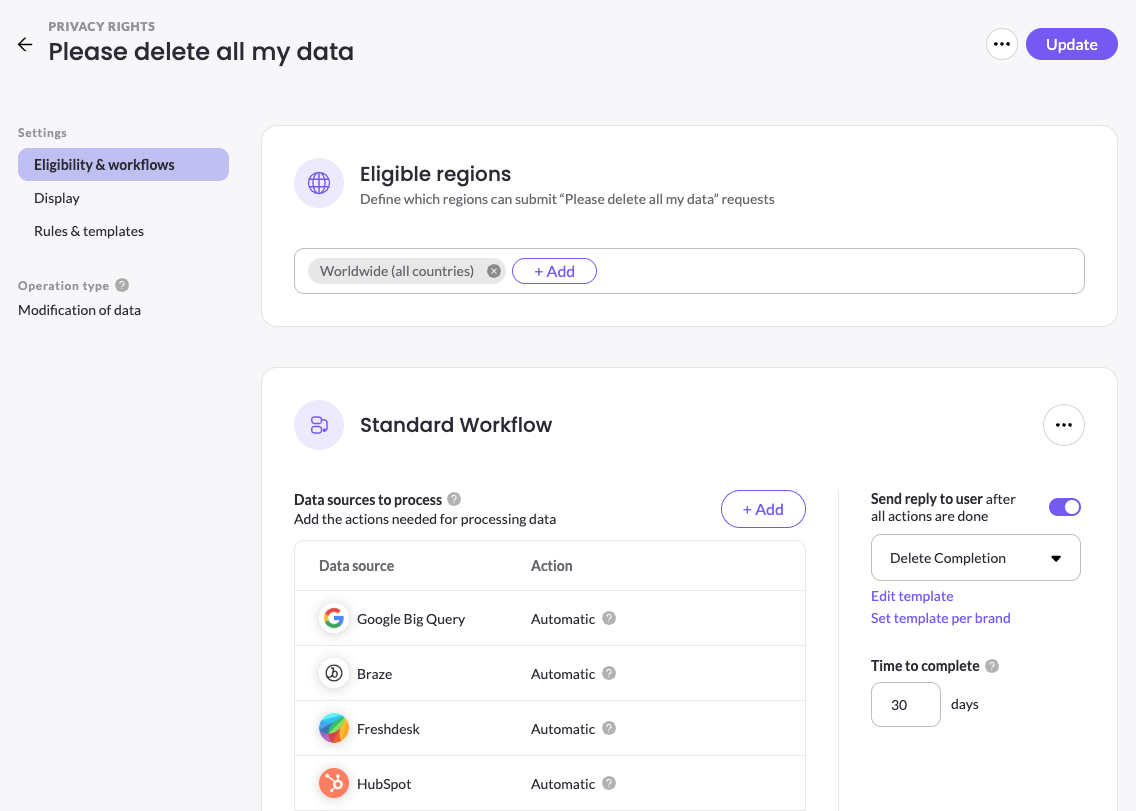
The processing workflow
The workflow defines the actions MineOS runs to fulfill a request for this right. Under Data sources to process, click + Add to add each connected data source and choose the action to take on it — for example, Automatic processing a Manual confirmation step for one source, or Assign coworker (email) for another. How each system is handled is covered in Setting Up DSR Handling Type.
Reply and completion
Turn on Send reply to user after all actions are done to automatically notify the data subject once every action in the workflow is complete, and choose the completion template to send. You can edit that template or set a different one per brand.
Time to complete
Set Time to complete, in days, to define the deadline for this right. MineOS uses it to set each request's due date, helping your team respond within regulatory timeframes. The default value is 30 days.
Operation type
Each right's operation type — shown as Data collection or Modification of data — reflects whether the request returns data or changes it. It's set when the right is created and determines how the workflow processes the request.
Updated 3 months ago