
The Requests Page
Navigate, search, filter, and organize your DSR queue from the Requests page
The Requests page is your working queue — every data subject request across all channels and brands, in one place. From here you search, filter, organize, and open requests to process them.
Note: Prior to August 16th, 2026, the Requests page didn't present closed, redacted or unverified requests older than 3 months. This behavior is now changed, and closed, redacted and unverified requests are shown directly in the portal, regardless of age.
Views and counts
The left panel gives you quick ways to slice the queue:
- Active requests — starts with All open and its total, plus quick views like Requires attention, Unread new requests, Unread new responses, and All unread.
- Saved views — filter combinations you've saved for reuse (see Save, below).
- Rights — a breakdown of open requests by privacy right, each with its own count.
Search
Use the search bar to find a request by email or request ID.
Filter
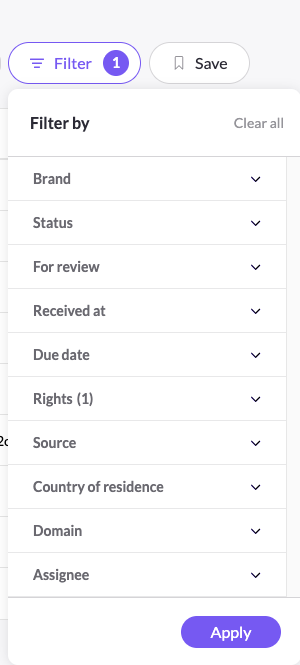
Click Filter to narrow the queue. You can filter by:
- Brand — the brand a request belongs to.
- Status — Unverified, Edit, Process, Pending, Reply, Closed, Redacting, or Redacted.
- For review — Requires attention, Unread new requests, Unread new responses, All unread, or Autopilot error.
- Received at — Last 7, 30, or 45 days.
- Due date — Overdue, Due today, Due in the next 7 days, or Due in the next 14 days.
- Rights — one or more privacy rights.
- Source — Mine, Email forwarding, Web form, Manual, API, or Import.
- Country of residence — the data subject's country.
- Assignee — the user group a request is assigned to (for example DSR, Everyone, or your custom teams), plus Unassigned.
Set your filters and click Apply, or Clear all to reset.
Save a view
Once you've applied a set of filters, click Save to keep that combination as a saved view, so you can return to the same slice of the queue with one click.
Choose your columns
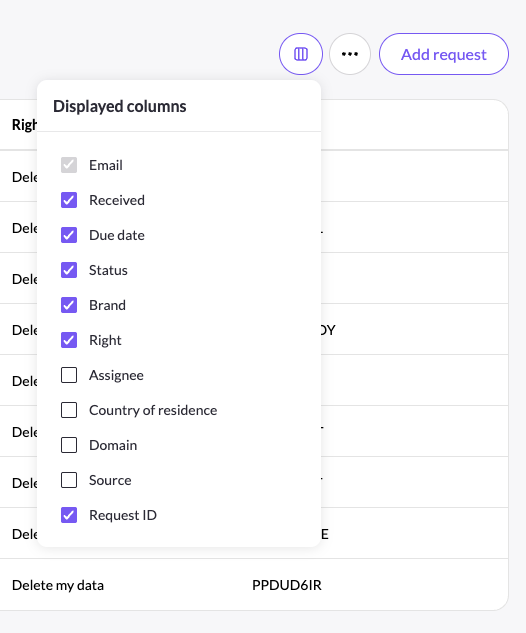
Use the columns button to pick which columns appear in the table — Received, Due date, Status, Brand, Right, Assignee, Country of residence, Domain, and Source. (Email is always shown.)
Pagination
You can browse easily through requests by navigating to the first, last, previous and next pages and decide how many requests to present per page: 10/25/50/100. On the left side you will see a counter of how many requests are shown in total and per page.

More actions
The ⋯ menu offers Export audit log (all requests) and Import requests. To log a request by hand, use Add request.
Open a request
Click any row to open that request's detail page, where you process it, communicate with the data subject, and track its audit log.
Updated 3 months ago