
Lusha DSR integration
Automate privacy request handling by integrating MineOS with Lusha.
Missing an action you need, or an integration we don't support yet? Contact your Customer Success Manager.
Lusha is a B2B contact data platform. Your team uses it to find people, reveal their contact details and save them into lists. The Lusha DSR integration finds a requester in your company's Lusha account by email, sends them a copy of what your account holds about them, and removes them from your lists on deletion requests.
How It Works
MineOS searches every contact list in your Lusha account, across all users, for the requester's email address, ignoring letter case. It also checks contacts your team revealed without saving them to a list, and job-change alerts set on the person.
- Preview: shows whether the requester was found, which lists they're saved in, and which kinds of data your account holds about them.
- Get a copy: sends the requester the data your Lusha account holds about them: name, job title, company, location, LinkedIn profile, the email addresses and phone numbers your team revealed, the lists they're saved in and any job-change alerts.
- Delete: removes the requester from every Lusha list they're saved in, and deletes any job-change alerts set on them. Other contacts in those lists aren't affected.
| Data in your Lusha account | Preview | Get a copy | Delete |
|---|---|---|---|
| Contacts saved in lists | Yes | Yes | Yes |
| Revealed emails and phone numbers | Yes | Yes | No |
| Job-change alerts | Yes | Yes | Yes |
Note: Lusha keeps a record that your account revealed a person's contact details, and the person's profile remains in Lusha's own database. These can't be removed through the integration. The requester can ask Lusha directly to remove their profile through Lusha's Removal Form, or by emailing [email protected]. Copies you exported from Lusha to other tools, such as your CRM, need to be handled in those tools.
Note: Each request reads your Lusha lists, which uses Lusha credits from your account, about 1 credit per 25 saved contacts.
Before You Start
- Your Lusha plan must include API access.
- Have a Lusha API key ready. An admin or manager of your Lusha account can create one in the Lusha dashboard under API → Manage API Keys (Manage API Keys page). One key covers the lists of every user in your Lusha account.
- Make sure your Lusha account has credits available, because each request uses some.
Setting Up
-
Log in to MineOS. On the left sidebar, click Inventory → Add data source, search for Lusha and add it.
-
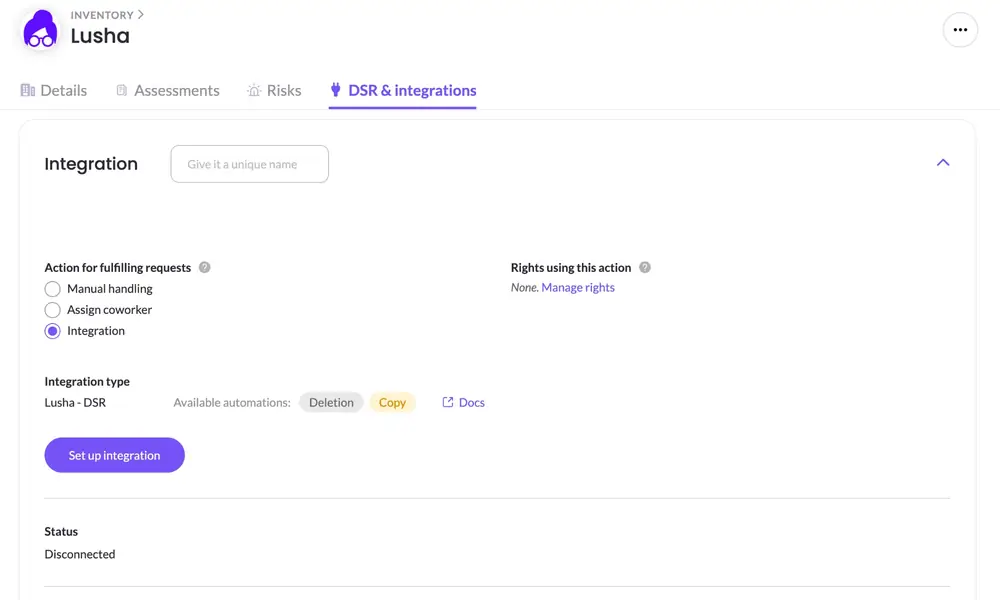
Open the Lusha system and go to the DSR & integrations tab.
-
Under Action for fulfilling requests, select Integration. In the Integration type dropdown, select Lusha - DSR, then click Set up integration.
-
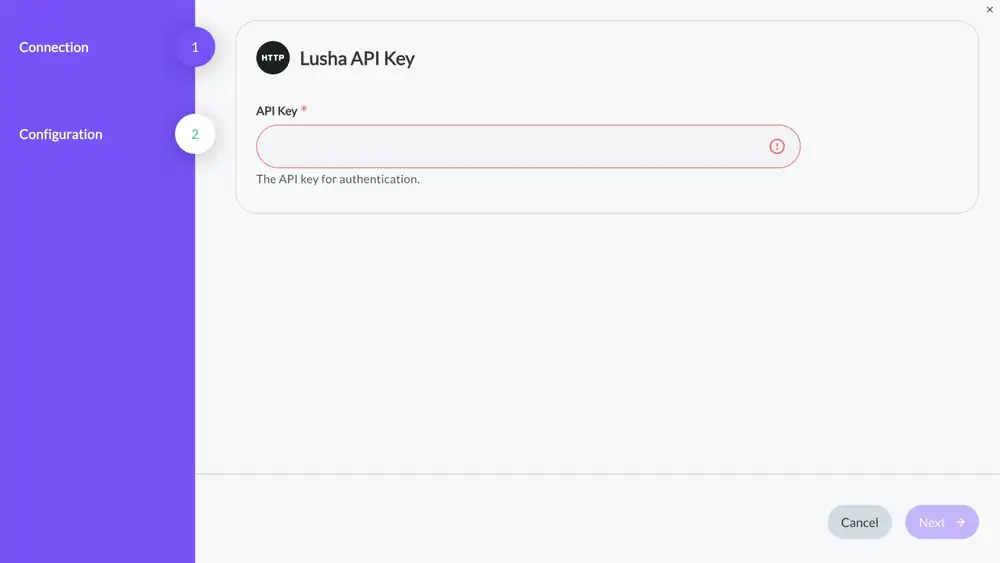
In the setup wizard, enter your Lusha API Key and click Next.
-
Click Finish.
You're done! MineOS has been connected to your Lusha account.
Using the Integration in Requests
To handle requests automatically, add the Lusha - DSR integration to the workflows of the privacy rights it should handle, such as Delete my data and Get a copy of my data. On the Lusha system's DSR & integrations tab, click Manage rights next to Rights using this action. See the integration's scope under How It Works.
Troubleshooting
The request fails with an authentication error
The API key is wrong, expired or was revoked. Check that it's active under API → Manage API Keys in Lusha, then update it in the integration with Edit integration.
The request fails with an access or permission error
Your Lusha plan doesn't include API access. Contact Lusha to enable it.
The request fails because of credits
Your Lusha account doesn't have enough credits left. Add credits in Lusha, then run the request again.
A requester you expected wasn't found
MineOS matches the requester's email against the email addresses your team revealed in Lusha. If the person was saved without revealing their email, or under a different email, they won't be matched.
Need Help?
If you need any help with this integration, please contact your Customer Success Manager. They will be happy to assist you!
Updated about 13 hours ago