
URL & Custom Domain
Configure the public URL where data subjects access your Privacy Center, set up a custom domain, and embed the form on your website.
The URL tab shows your Privacy Center's public address and provides the embed snippet for adding it to your website. Unlike other tabs, URL changes take effect immediately when you click Publish new URL — there is no Save draft step for the URL.
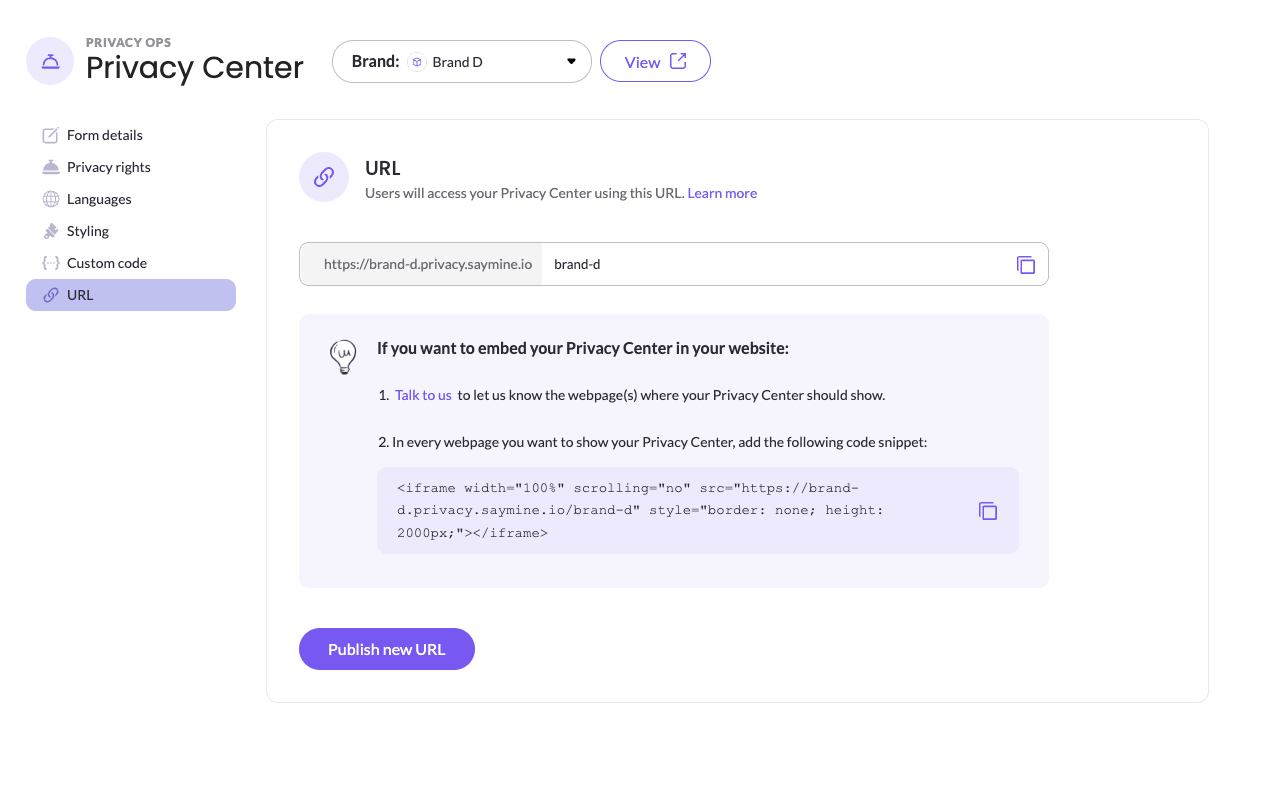
Your Privacy Center URL
Your Privacy Center URL contains two parts that identify your brand:
- Subdomain — the part before
.privacy.saymine.io - Slug — the last part of the URL, after the final
/
https://your-brand.privacy.saymine.io/your-brandBoth are generated automatically from your brand name when the brand is created. The name is converted to lowercase, and spaces and special characters are replaced with hyphens. For example, a brand named "Brand D" gets the URL https://brand-d.privacy.saymine.io/brand-d. If the generated name is already in use by another Privacy Center, a number is added to the end (for example, brand-d-2).
The subdomain stays the same once it's assigned and can't be changed in the URL tab. The slug can be changed at any time in the URL tab. The slug:
- Can contain letters, numbers, hyphens (
-), and underscores (_) - Must start and end with a letter or number
- Must be unique across all Privacy Centers on the MineOS platform
If you see a "URL is already taken" error, only the slug needs to be unique — not the full URL. Choose a different slug and try again.
Changing the URL slug
- Edit the slug in the URL field
- Click Publish new URL
The new URL is live immediately. If you had the Privacy Center embedded on your website using the old URL, update the iframe snippet with the new URL.
Changing the slug does not affect the rest of your Privacy Center configuration — your form, styling, and published content remain intact.
Note: If you rename your brand after the Privacy Center has been created, the URL slug is not automatically updated to reflect the new name. To update the slug, go to the URL tab and change it manually, then click Publish new URL.
Embedding the Privacy Center on your website
To embed your Privacy Center directly on a page or domain of your website rather than linking to it as a standalone page:
- Contact your Customer Success Manager to let MineOS know which domain you want to embed the Privacy Center on
- Add the following iframe snippet to every page where the Privacy Center should appear:
<iframe width="100%" scrolling="no" src="https://your-brand.privacy.saymine.io/your-brand" style="border: none; height: 2000px;"></iframe>The snippet with your actual URL is available to copy directly from the URL tab.
Custom domain
By default, your Privacy Center is hosted on a MineOS domain (your-brand.privacy.saymine.io). If you'd rather data subjects reach it through your own domain, such as privacy.your-company.com, you can set up a custom domain.
Step 1: Create a DNS record
- Sign in to your DNS management console (for example, your domain registrar or DNS provider).
- Choose the domain that will host your Privacy Center. We recommend a subdomain of your customer-facing website, for example
privacy.your-company.com. - Create a new DNS record with these values:
| Type | Name | Value | TTL |
|---|---|---|---|
| CNAME | The full domain you want to use, e.g. privacy.your-company.com | privacy.saymine.io | Leave as default |
DNS changes usually take effect within a few minutes, but can take up to 72 hours to propagate.
Step 2: Contact your Customer Success Manager
Tell your Customer Success Manager which domain you set up. They'll verify the DNS record and complete the configuration on the MineOS side.
Once setup is complete, your Privacy Center is available at your custom domain followed by your URL slug, for example https://privacy.your-company.com/your-slug. If you've embedded the Privacy Center on your website, update the iframe src to use the new address.
The URL tab always shows your default MineOS address, and the iframe snippet in the URL tab uses that address too. After your custom domain is set up, your Privacy Center is reachable at both addresses. If you embed it on your website and want visitors to see your own domain, replace the address in the snippet's
srcwith your custom domain.
If you have questions about setting up a custom domain, contact us at [email protected].
Updated 2 days ago