
SSO discovery - Google Workspace
Connect your Google Workspace email to discover the systems your employees use, including unmanaged tools and dormant accounts.
SSO discovery finds the systems connected to your identity provider and shows which employees have access to each one. Connecting Google Workspace SSO discovers the managed systems your employees sign in to with their Google account.
Before you start
You'll need access to the Google Workspace Admin console.
Step 1: Allow the MineOS SSO Discovery app in Google Workspace
- Sign in to the Google Admin console.
- Go to Security › Access and data control › API controls.
- Under App access control, click Manage App Access.
- Under Configured apps, click Configure new app.
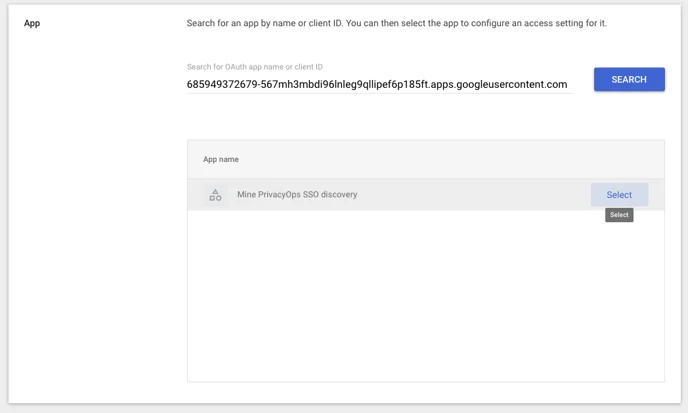
- In App Name or Client ID, paste the following value and click Search:
685949372679-567mh3mbdi96lnleg9qllipef6p185ft.apps.googleusercontent.com
-
Select MineOS SSO Discovery
-
Choose the OAuth client ID and click Select.
-
When asked which organizational units to apply the app to, select your entire organization, and click Continue.
-
Select Trusted and click Continue.
-
Review the settings and click Finish.
SSO discovery always scans your entire Google Workspace organization, whichever organizational units you select in step 8.
For more information, see Google's guide to controlling which apps access Google Workspace data.
Step 2: Connect in MineOS
- Sign in to MineOS.
- In the left navigation, under Data mapping, select Radar.
- Click Radar Setup.
- Under Single Sign-On, select Google.
- Click Sign in with Google and complete the authorization flow.
A message confirms the connection was successful, and discovery starts.
Permissions
| Scope | Why MineOS needs it |
|---|---|
admin.directory.user.readonly | Read your employee directory, to show which employees have access to each system |
All permissions are read-only. [confirm: any other scopes requested in the Sign in with Google step]
What happens next
Discovered systems appear in Radar, with the employees who have access to each one. Discovery continues automatically, so new systems appear as employees start using them. See Reviewing findings.
Related articles
- Discover your data sources with Radar: all discovery methods and the security FAQ
- Connect Google Workspace email: add email discovery for wider coverage
- Employees discovery: see who uses each system
Updated 19 days ago