
In-request Communications
Message the data subject directly from a request — free text or a template — with everything kept in the audit log.
While you're working a request, you often need to reach out to the data subject — to ask for more information, share an update, or send a response. In-request communications let you do that directly from the request, without switching to your email client, and every message is recorded on the request's audit log.
The Email composer
Open a request and use the composer in the Audit log panel. You can reach it by clicking on Email user on the upper-right side of the screen or Show more near the Audit log title. The composer has two tabs:
- Email — a message sent to the data subject.
- Note — an internal note for your team. Notes are recorded on the request but are not sent to the data subject.
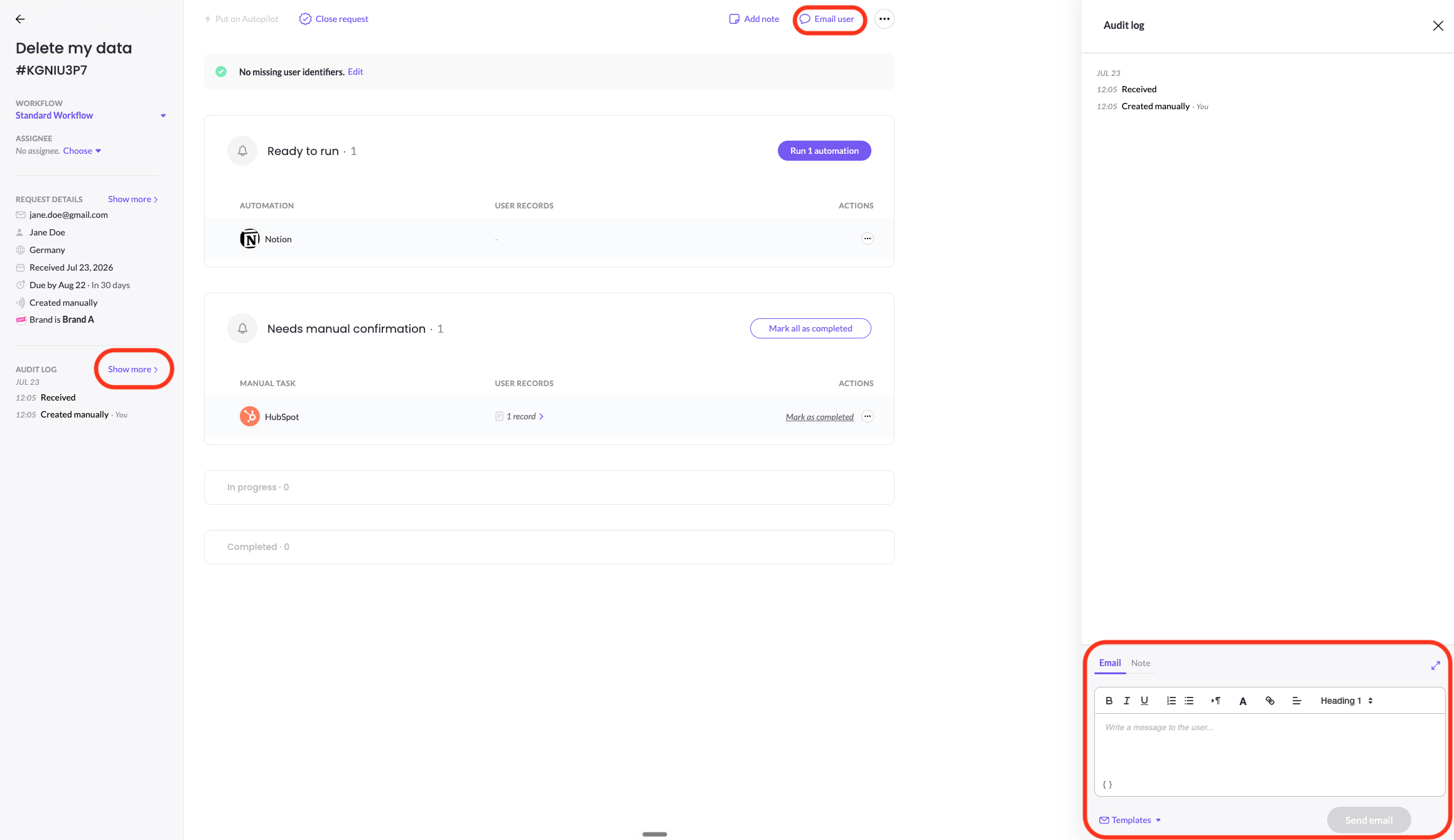
Send an email to the data subject
On the Email tab, write your message as free text using the formatting toolbar, then click Send email. The data subject receives it, and your message is logged on the request.
Use a template instead
If you'd rather send a standard response, click Templates and choose one — for example Delete Completion, Acknowledgement, or a rejection template — and pick the language to send it in. The template fills the composer, where you can still edit it before sending.
Everything is logged
Both emails and notes appear on the request's audit log alongside the automated lifecycle emails, giving you a complete, timestamped history of every communication on the request.
Updated 3 months ago